Change Calendar Time Zone
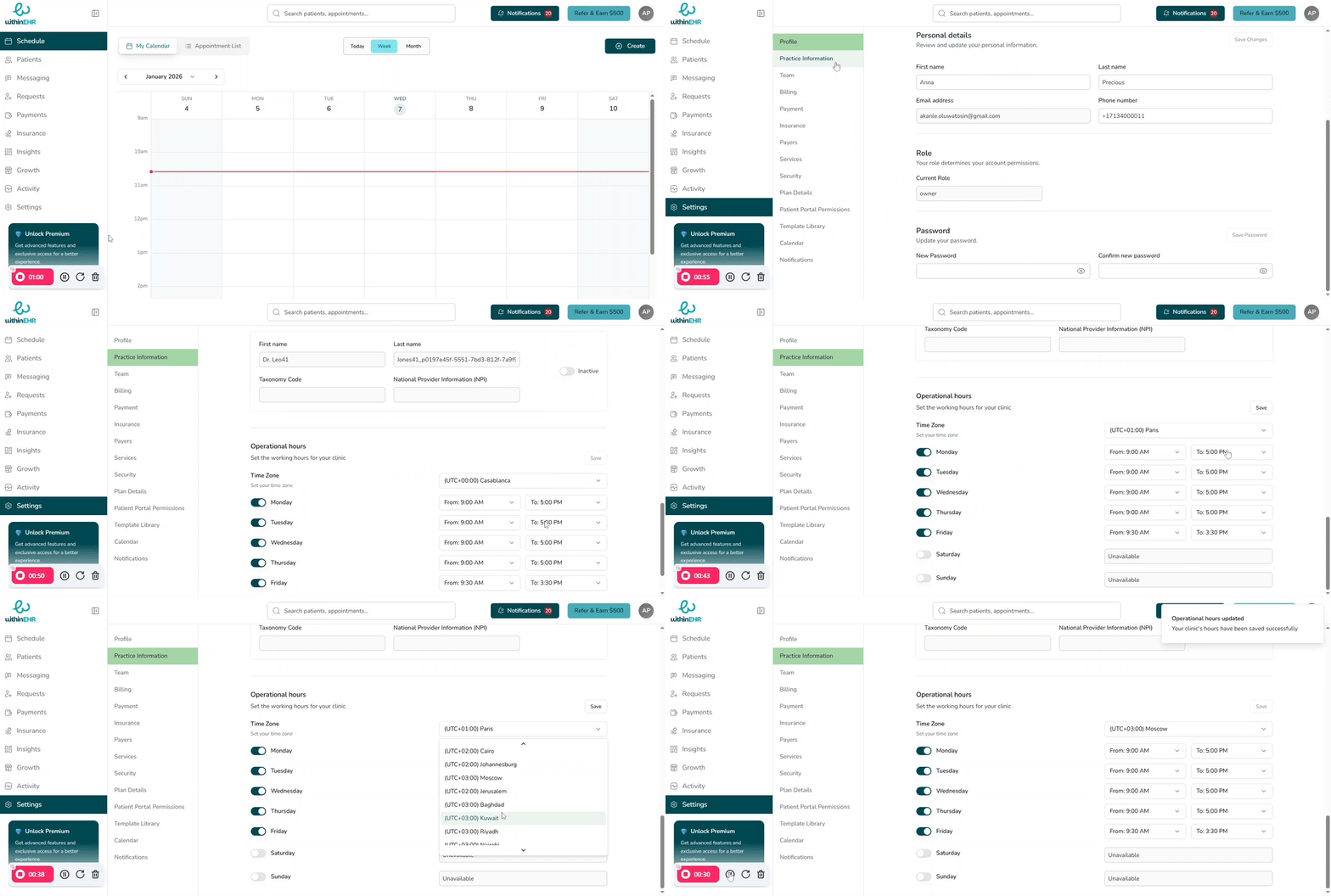
Changing your calendar time zone ensures every appointment displays at the correct local time while preserving the actual moment the appointment occurs. In a distributed healthcare environment, time zone accuracy is not a convenience — it is a patient safety requirement.
Why Time Zone Accuracy Matters
Patient Safety and Medication Management
Time zone misalignment poses direct clinical risks.
- Dosing Intervals: For medications requiring strict timing — insulin, anticoagulants, chemotherapy — a time zone error can cause a missed or double dose.
- Stat Orders: Urgent orders must be timestamped relative to the patient's local time to ensure immediate action.
Clinical Documentation and Legal Integrity
- Audit Trails: EHR systems rely on linear timestamps. Inconsistent time zones can make the sequence of clinical events ambiguous — legally and medically.
- Regulatory Compliance: HIPAA and other healthcare frameworks require precise audit logs. Inconsistent time zones can invalidate logs during a compliance audit.
Telehealth and Care Coordination
- Appointment Continuity: Prevents no-shows caused by confusion between provider and patient local times.
- Hand-offs: Synchronized timestamps ensure no lapse in monitoring during patient transfers between facilities or shifts.
How Time Zone Changes Affect Events
- Existing events shift, not the moment: A visit at 10:00 AM Eastern will display as 3:00 PM London time after a time zone change — but it is still the same global moment.
- New events use the new zone: Any appointments created after the change are stored and displayed in the updated time zone.
Steps to Change Your Calendar Time Zone
- Go to Settings in WithinEHR.
- Open Practice Information.
- Find the Operational Hours section.
- Select the time zone that matches your primary practice location.
- Click Save to apply.
- Review a few upcoming appointments to confirm they display at the correct local time.
Tips
- Use city-based time zones (e.g., "America/New_York" or "Europe/London") instead of fixed GMT offsets so your schedule adjusts automatically for daylight saving time.
- If you work across regions, check whether you can set a personal time zone separate from the practice time zone.