Setting Up Appointment Reminders
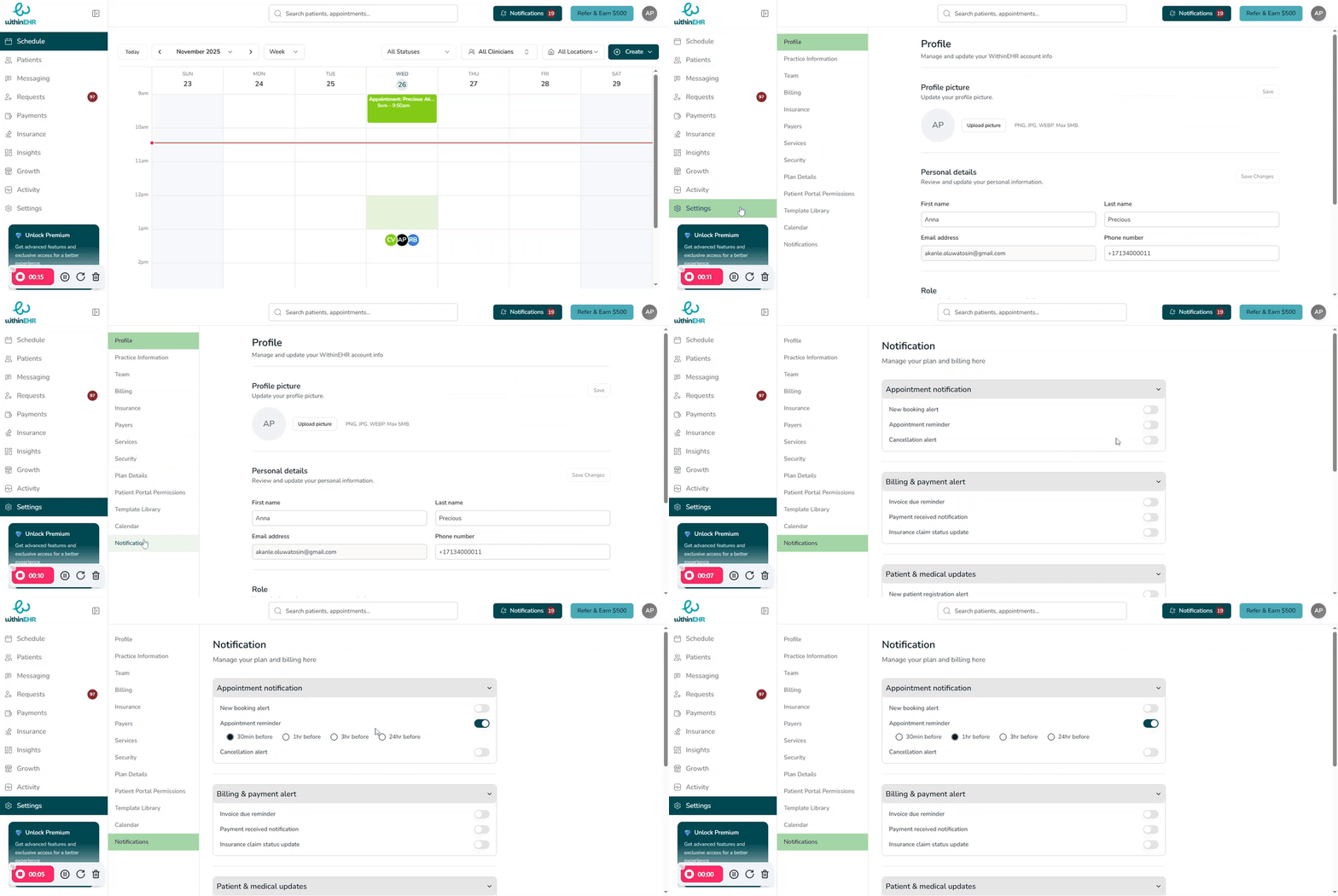
Automated appointment reminders dramatically reduce no-shows by notifying clients at the right time through their preferred channels — without adding extra work for your team.
Before You Start
- Confirm that client contact details (email address and mobile number) are correct and that you have permission to contact them via email and SMS.
- Decide on a reminder strategy — for example, one early reminder and one same-day reminder — that fits your clientele and cancellation policy.
Steps to Set Up Appointment Reminders
- Go to Settings and open the Notifications or Client Notifications area.
- Locate Appointment Reminders and toggle them On.
- For each available channel (Email, SMS, or Voice), turn the toggle On to enable that channel.
- Configure timing:
- Set your email reminder to send 48 hours before the appointment.
- Set your SMS reminder to send 2 hours before the appointment.
- Customize message content (optional) — include your practice name, appointment date and time, location, and any relevant instructions or links.
- Click Save to apply your reminder sequence.
Tips
- Use email for earlier reminders with more detail, and SMS for short same-day prompts that clients see quickly on their phones.
- Periodically review your no-show rate and adjust reminder timing or channels to optimize attendance without over-messaging clients.