Sync Calendar
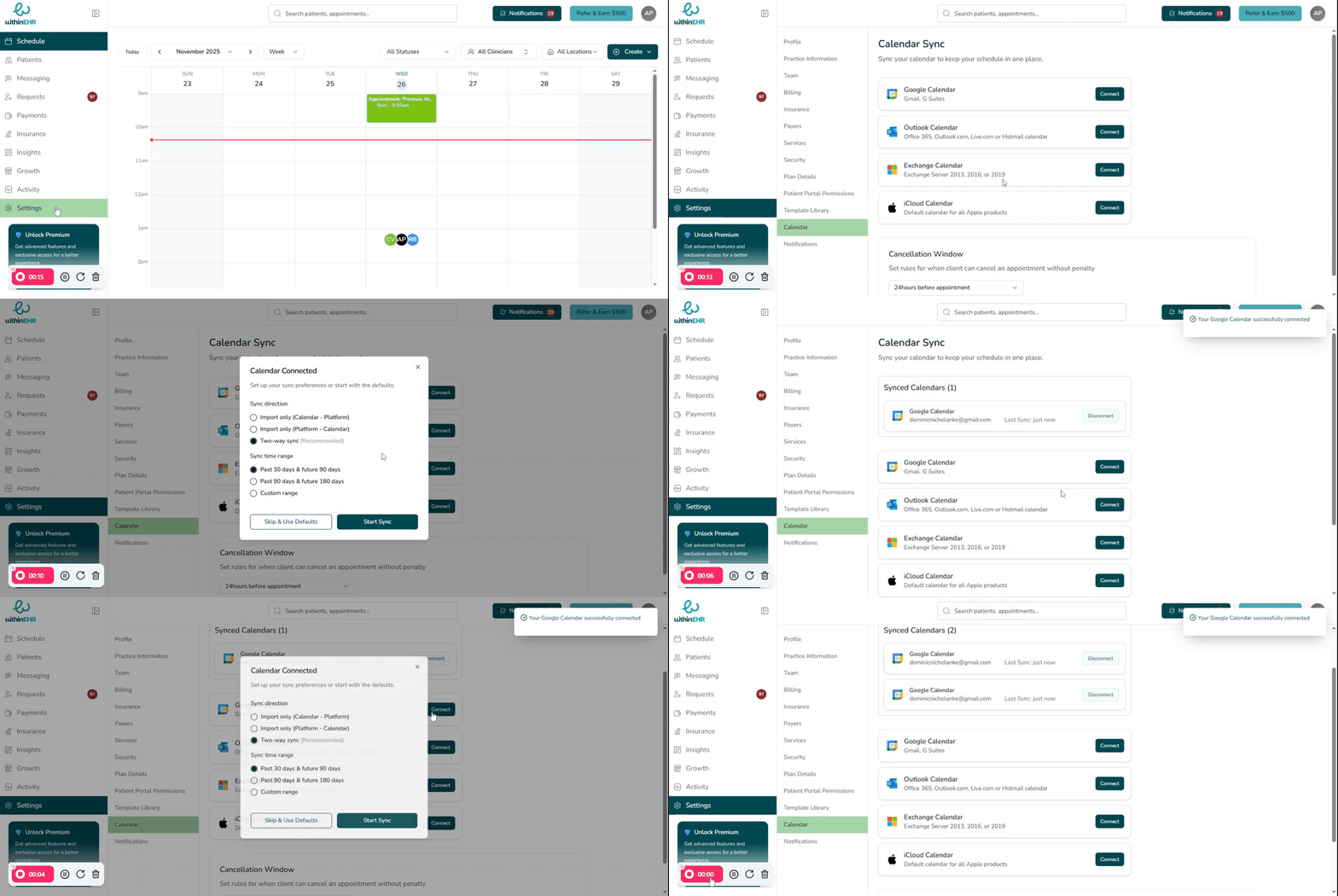
Syncing your calendar lets WithinEHR and your external calendar work together so that personal and professional events stay aligned and double-bookings are avoided.
How Calendar Sync Works
- Connection: You securely connect WithinEHR to your external calendar provider using that provider's sign-in process — no password is shared directly with the EHR.
- Sync Direction: Choose whether events flow one way (EHR to external calendar only) or two ways (external events also block time in the EHR).
- Sync Window: A sync time range determines how far into the past and future events are kept in sync.
Before You Start
- Decide which external calendar to connect (Outlook, Google Calendar, or Apple Calendar).
- Confirm your practice time zone and operational hours are already set.
Steps to Set Up Calendar Sync
- Navigate to Settings, then open the Scheduling or Calendar section.
- Find the Calendar Sync integration area.
- Select your external calendar provider.
- Choose your Sync direction and Sync time range.
- Click Start Sync or Connect, then sign in to your external calendar and approve access.
- Verify that upcoming WithinEHR appointments appear on your external calendar.
Tips
- Periodically review your synced calendars to ensure events are updating correctly and no sensitive information is exposed in non-secure environments.
- If you stop using an external calendar, return to Settings to disconnect that sync so your availability stays accurate.