Getting Started with Scheduling
Scheduling in WithinEHR is more than placing appointments on a calendar — it is the critical bridge that connects a patient's need to a provider's expertise. A properly configured scheduling workflow supports clinical safety, reduces administrative friction, and ensures every patient interaction begins with precision and care.
This guide walks you through the foundational setup so your practice can move from reactive, phone-based booking to a streamlined, patient-centered care model.
Why Scheduling Setup Matters
In the WithinEHR ecosystem, scheduling is the heartbeat of the clinical workflow. How you configure it from day one directly affects patient outcomes, provider efficiency, and your practice's compliance posture.
Effective scheduling documentation ensures your facility can eliminate administrative "phone tag" and replace it with a reliable, auditable, and patient-friendly process.
Importance of Getting Started with Scheduling
1. Continuity of Care and Clinical Outcomes
Properly configured scheduling ensures patients are seen at the right time by the right provider. In healthcare, a delay in scheduling can mean a delay in diagnosis — and that has real clinical consequences.
- Urgency Triaging: High-priority cases must be identifiable within the scheduling system to prevent critical health escalations.
- Adherence and Follow-Through: Automated reminders built into the scheduling setup reduce no-show rates by up to 35%, keeping patients on track with their treatment plans.
2. Operational Efficiency and Resource Optimization
WithinEHR helps clinics maximize their most valuable assets: time and medical personnel.
- Provider Load Balancing: A well-configured schedule prevents clinician burnout by distributing appointments logically across the day and week.
- Room and Resource Utilization: Matching appointment types (e.g., imaging vs. consultation) to available clinical spaces reduces idle time for staff and equipment.
3. Data Integrity and HIPAA Compliance
Setting up scheduling correctly from day one ensures that Patient Health Information (PHI) is handled securely at every touchpoint.
- Secure Intake: Capturing patient data during the booking process enables pre-visit verification of insurance and medical history.
- Audit Trails: Every scheduled slot creates a digital footprint — essential for healthcare compliance, billing accuracy, and clinical accountability.
4. The Patient Experience
Modern patients expect a frictionless digital experience from their first interaction with your practice.
- Self-Service Booking: 24/7 online booking improves patient satisfaction and reduces the administrative burden on front-desk staff.
- Clear Expectations: A properly configured schedule ensures patients receive instant confirmations with location details, preparation instructions (e.g., "fasting required"), and cancellation policies — reducing confusion and last-minute cancellations.
How to Create an Appointment
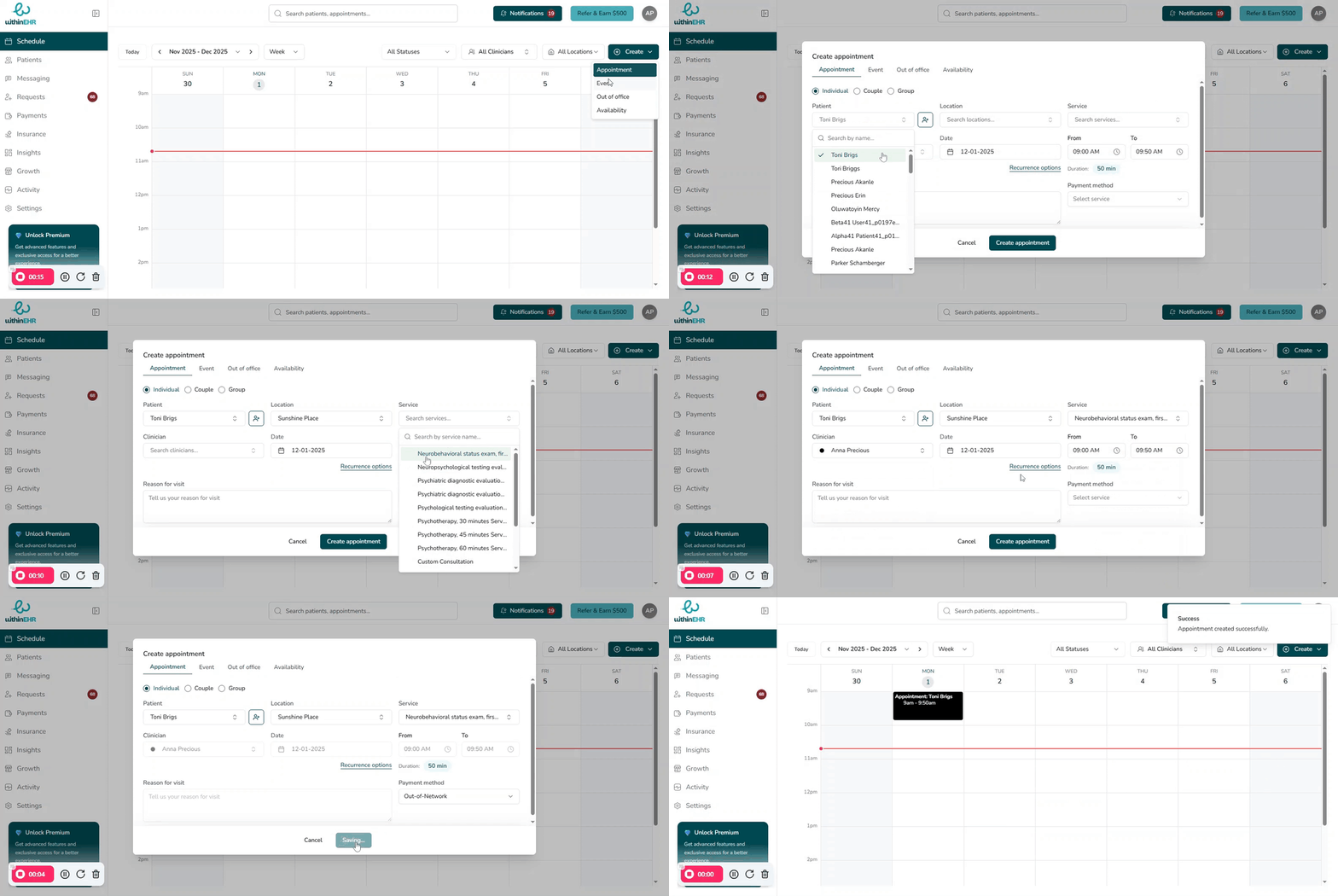
Follow these steps to schedule your first appointment in WithinEHR:
- Click Create at the top right of your schedule calendar.
- Select a schedule option from the dropdown.
- Fill in the required fields — patient, provider, date, time, and appointment type.
- Click Create Appointment to confirm.