Adjusting Your Client's Language
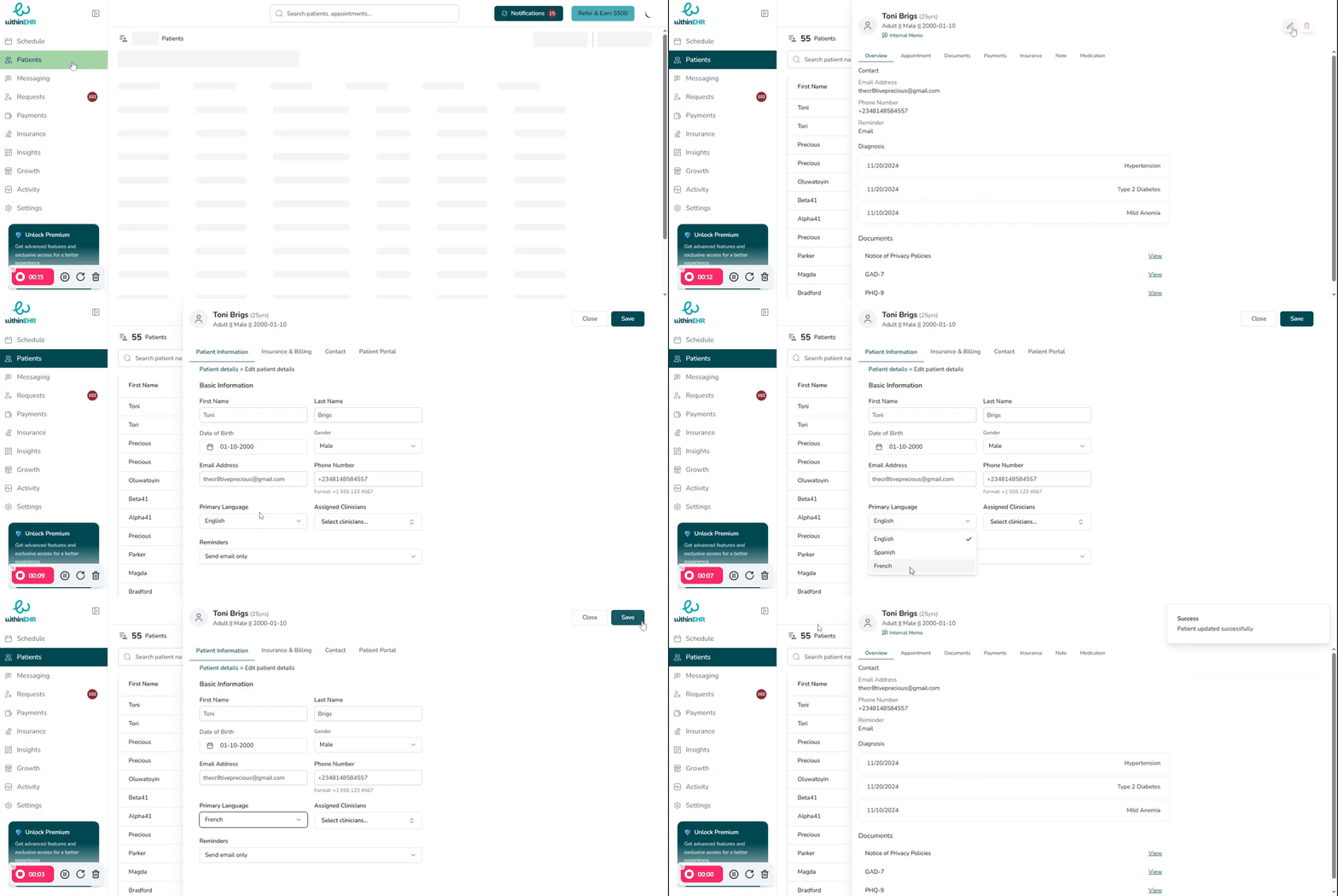
Setting a client's language preference ensures that all automated communications — booking confirmations, reminders, and portal messages — are delivered in their native language. This reduces confusion, improves treatment adherence, and supports compliance with regulations for individuals with limited English proficiency (LEP).
Why Language Preference Matters
- Clinical Accuracy: Patients who receive information in their preferred language are more likely to understand their care plan and follow through with treatment.
- Compliance: Documenting language preference is required for LEP compliance under federal and state healthcare regulations.
- Workflow Efficiency: The EHR can automatically generate forms and communication templates in the client's chosen language, reducing manual translation work.
How to Adjust the Client Language
- Search for the client's name and open their record.
- Open the Demographics tab and click Edit.
- Find the Preferred Language field.
- Use the dropdown to select the client's language (e.g., English, Spanish, Mandarin, French).
- Click Save.