Customize Your Client Record
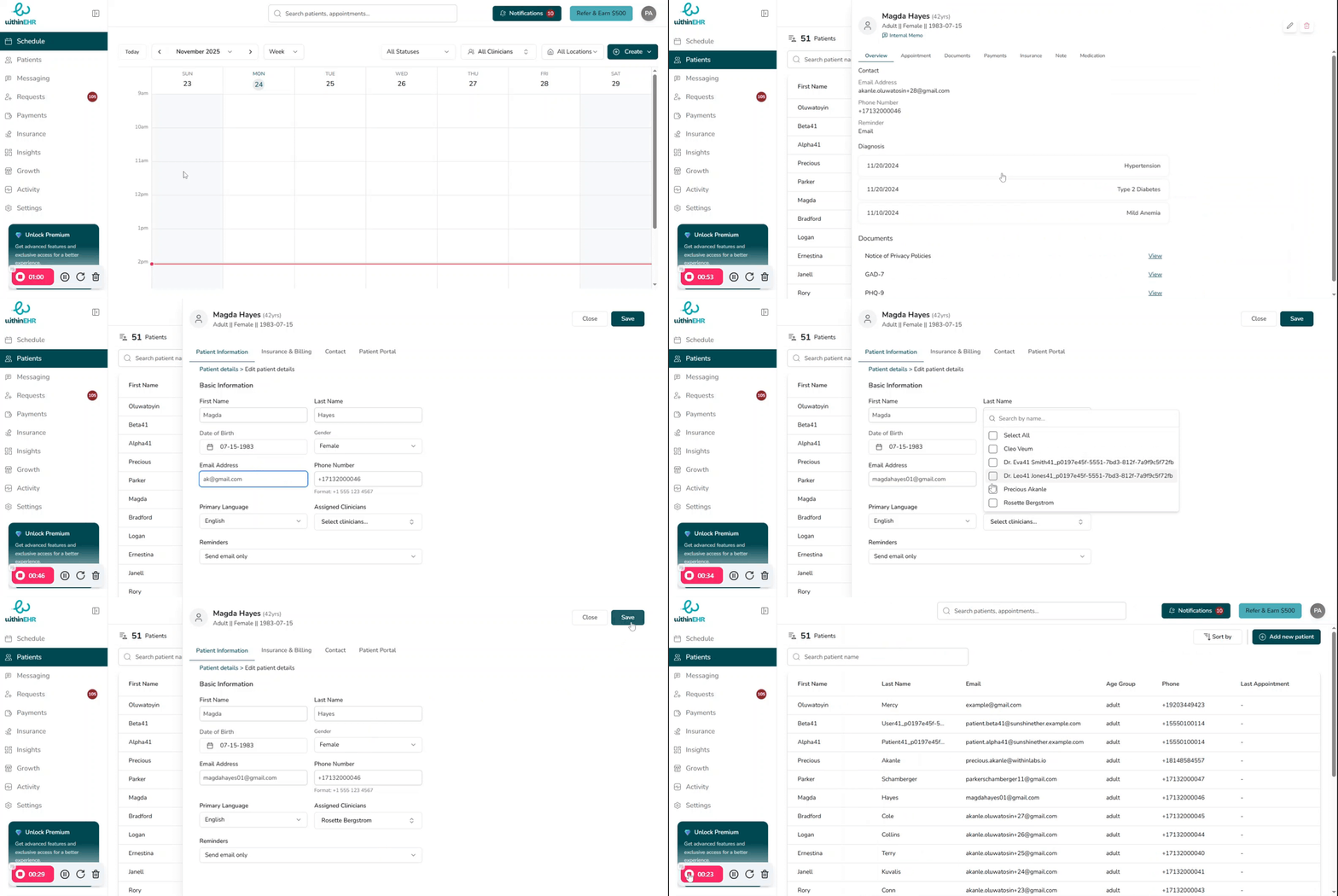
Keeping client information accurate and up to date is a clinical necessity. Inaccurate data can lead to medical errors, compliance failures, and billing delays.
Why Accurate Client Information Matters
Clinical Accuracy and Patient Safety
- Contraindications: Failing to update an allergy or medication list can result in life-threatening drug interactions.
- Diagnostic Integrity: Incorrectly recorded history or symptoms can lead to a flawed treatment plan.
- Continuity of Care: When clients transition between departments or specialists, the updated record acts as the source of truth.
Regulatory Compliance
- Right to Rectification: Under HIPAA and data protection laws, clients have a legal right to have inaccurate personal data corrected.
- Audit Trails: Proper editing ensures records reflect the most current reality of a client's health — essential during audits or insurance reviews.
Operational Efficiency
- Billing Accuracy: Wrong insurance details or outdated addresses lead to claim denials and delayed payments.
- Communication: Current contact information reduces missed appointments and improves the client experience.
How to Edit a Client's Information
- Search for the client's name and open their record.
- Click the Edit button at the top of the Demographics tab.
- Navigate to the relevant section:
- Address / Phone — Patient Information tab
- Insurance / Policy Numbers — Insurance and Billing tab
- Make your changes.
- Click Save — do not exit before saving.