Logging Out
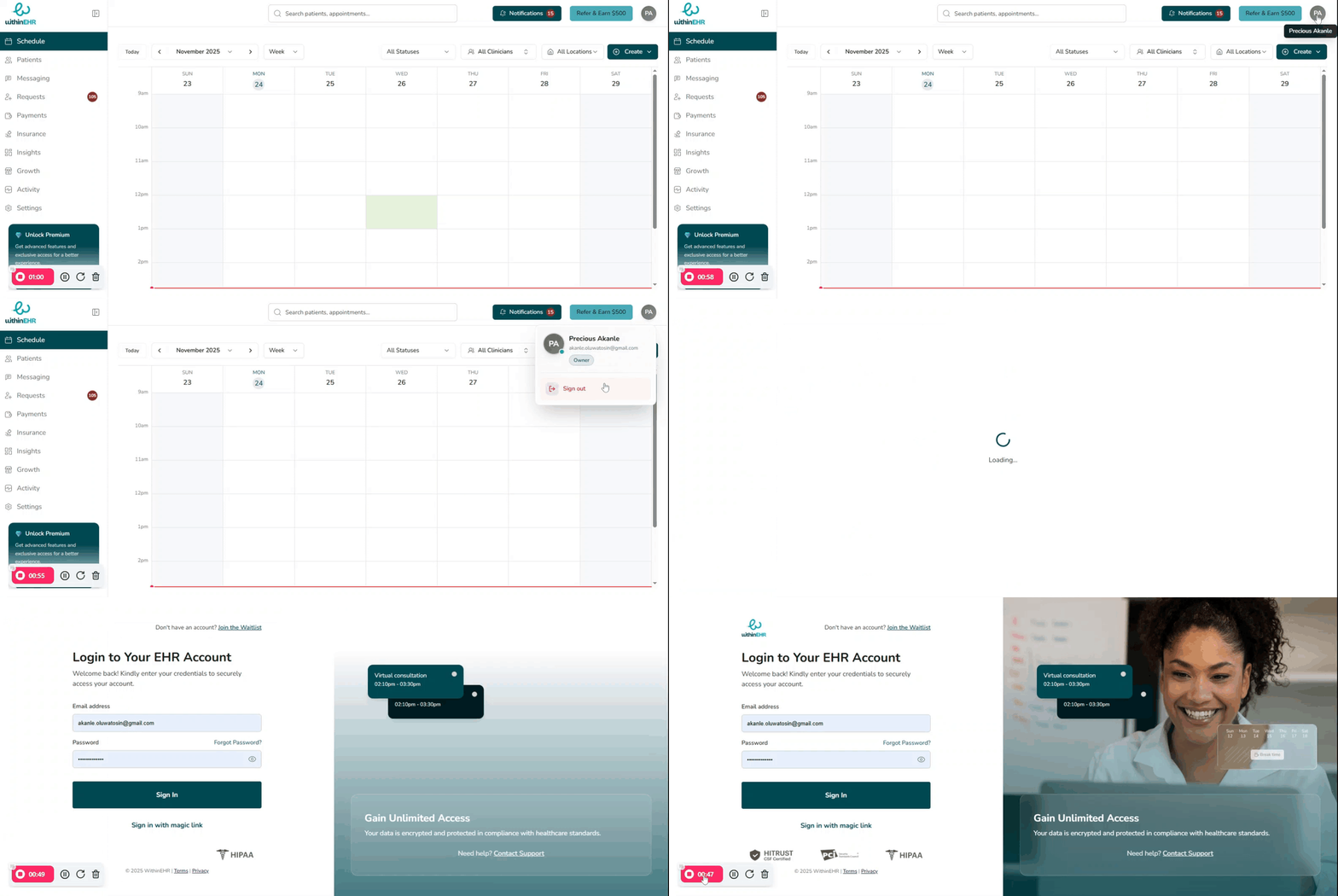
Logging out is a critical clinical and legal safety measure. Every unattended session is an open door to Protected Health Information (PHI). Proper logout protects your patients, your practice, and the integrity of your data.
Why Logging Out Matters
PHI Protection and HIPAA Compliance
- Preventing Unauthorized Access: An active, unattended session allows anyone nearby — other patients, unauthorized staff, or visitors — to view sensitive medical histories.
- Audit Trails: Every action in WithinEHR is tied to a specific user ID. If someone acts on your account because you did not log out, you are legally responsible for those entries.
Preventing Wrong-Patient Errors
In a fast-paced clinical environment, multiple staff members often share workstations. If one user forgets to log out and another begins entering data, that information could be saved to the wrong patient's record — a serious medical error.
Cyber Defense
- Session Hijacking: Active sessions use session tokens. If a device is compromised while logged in, attackers can hijack that token to bypass multi-factor authentication.
- Endpoint Security: Logging out clears temporary cache and cookies that might otherwise store sensitive data in the browser's memory.
How to Log Out
Never simply close your browser window — this often leaves your session active.
- Locate your initials or profile picture in the top-right corner of the WithinEHR screen.
- Click Sign Out.
- You will be immediately redirected to the login screen.